

Ambassador
✓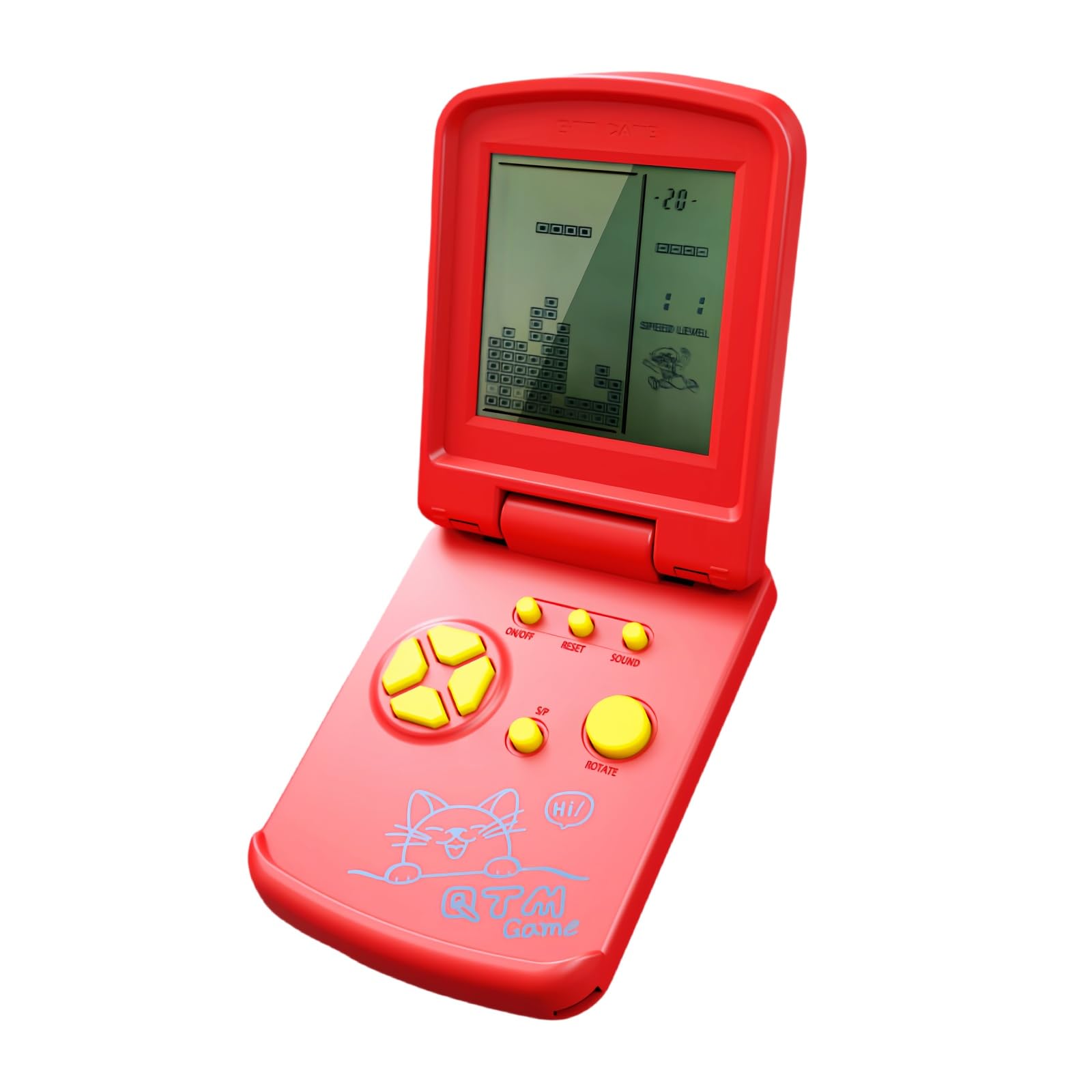
Product description Function key instructions 1.ON/OFF : Press ON/OFF key to turn on or off the game. 2. ROTATE: Press ROTATE key to select games before to start,it takes action in the selected game. 3. MUSIC:Press Sound key repeating to turn off or turn on the sound. 4. S/P (Start/Pause):Press S/P key to start or pause the selected game. 5.RESET:Press RESET to reset the game system. 6. UP/DOWN:Before starting the game, press UP/DOWN to select the mode of the selected game; In the game, press the UP/DOWN key to control the up/down direction of the game. 7. LEFT/RIGHT: Press LEFT/RIGHT keys to select the level(LEFT) and the speed(RIGHT) of the selected game before to start it.Press LEFT/RIGHT keys to control the left/right direction in game. Game list and Instructions Built-in 26 Games: A:Tanks war: UP/DOWN/LEFT/RIGHT key control direction, ROTATE key to launch bullets. B:Racing game: LEFT/RIGHT key control direction, ROTATE key to accelerate. C:Memory challenge game: Remember up/down/left/right squares flashing position and the number of times, then press the UP/DOWN/LEFT/RIGHT keys according to the position and number of times. D:Shooting game: LEFT/RIGHT key control direction, ROTATE key launch bullets. E:Barriers to play ball: UP/DOWN/LEFT/RIGHT key control direction, ROTATE to speed up the ball movement speed . F:Whack-a-mole game: According to flashing squares, then press the UP/DOWN/LEFT/RIGHT keys . G:Fill the shooting game: LEFT/RIGHT key control direction, ROTATE key fired bullets H:Mstching game: Press the UP/DOWN/LEFT/RIGHT key to make the following and the above box shape the same, then press the ROTATE key to collide. I:Classic Block game: LEFT/RIGHT key control direction, ROTATE key to deformation. J-Z:kinds of Brick game: LEFT/RIGHT key control direction, ROTATE key to deformation. Directions Function Keys Instructions 1. ON/OFF: Press the ON/OFF key to turn the game on or off. 2. OPTIONS: Press the OPTIONS key to select games before starting, the selected game will be activated. 3. MUSIC: Press the MUSIC key repeatedly to turn off or on the sound. 4. S/P (Start/Pause): Press the S/P key to start or pause the selected game. 5. RESET: Press RESET to restart the game system. 6. UP/DOWN: Before starting the game, press UP/DOWN to select the selected game mode; In the game, press UP/DOWN key to control the up/down direction of the game. 7. LEFT/RIGHT: Press LEFT/RIGHT keys to select the level (LEFT) and speed (RIGHT) of the selected game before starting it. Press LEFT/RIGHT keys to control the left/right direction in the game. Games List & Instructions Built-in 26 games: A: Tank Warfare - UP/DOWN/LEFT/RIGHT keys control direction, OPTIONS key to throw bullets. B: Racing Game: LEFT/RIGHT keys control direction, OPTIONS key to accelerate. C: Memory Challenge Game: Remember the position of the squares up/down/left/right flashing and the number of times, then press the UP/DOWN/LEFT/RIGHT keys according to the position and number of times. D: Shooting game: LEFT/RIGHT keys control direction, OPTIONS key throws bullets. E: Barriers to playing ball: Control the direction of the UP/DOWN/LEFT/RIGHT keys, OPTIONS to speed up the ball movement speed. F: Mole Hitting Game: According to the squares flashing, then press the UP/DOWN/LEFT/RIGHT keys. G: Complete the shooting game: control the direction of LEFT/RIGHT keys, OPTIONS key shoots bullets H: Fighting game: Press UP/DOWN/LEFT/RIGHT key to make the next and above shape equal, then press OPTIONS key to collide. I: Classic block game: control LEFT/RIGHT key direction, OPTIONS key to deform. J-Z: brick game types: control the direction of LEFT/RIGHT keys, OPTIONS key to deform. Safety Warning If not used for a long time, please remove the battery.
Customer reviews
10 Trustpilot reviews total, with 2 shown at a time.
I wrote to Bigamart's customer support and they accompanied the process of reshipping the item until it finally arrived. I felt a genuine effort to solve the problem till it was finally solved.
The package was here in Australia from England in a few days — so quick! Something was missing and they refunded it straight away. Pretty happy with these guys.
You might also like