
InTessry
✓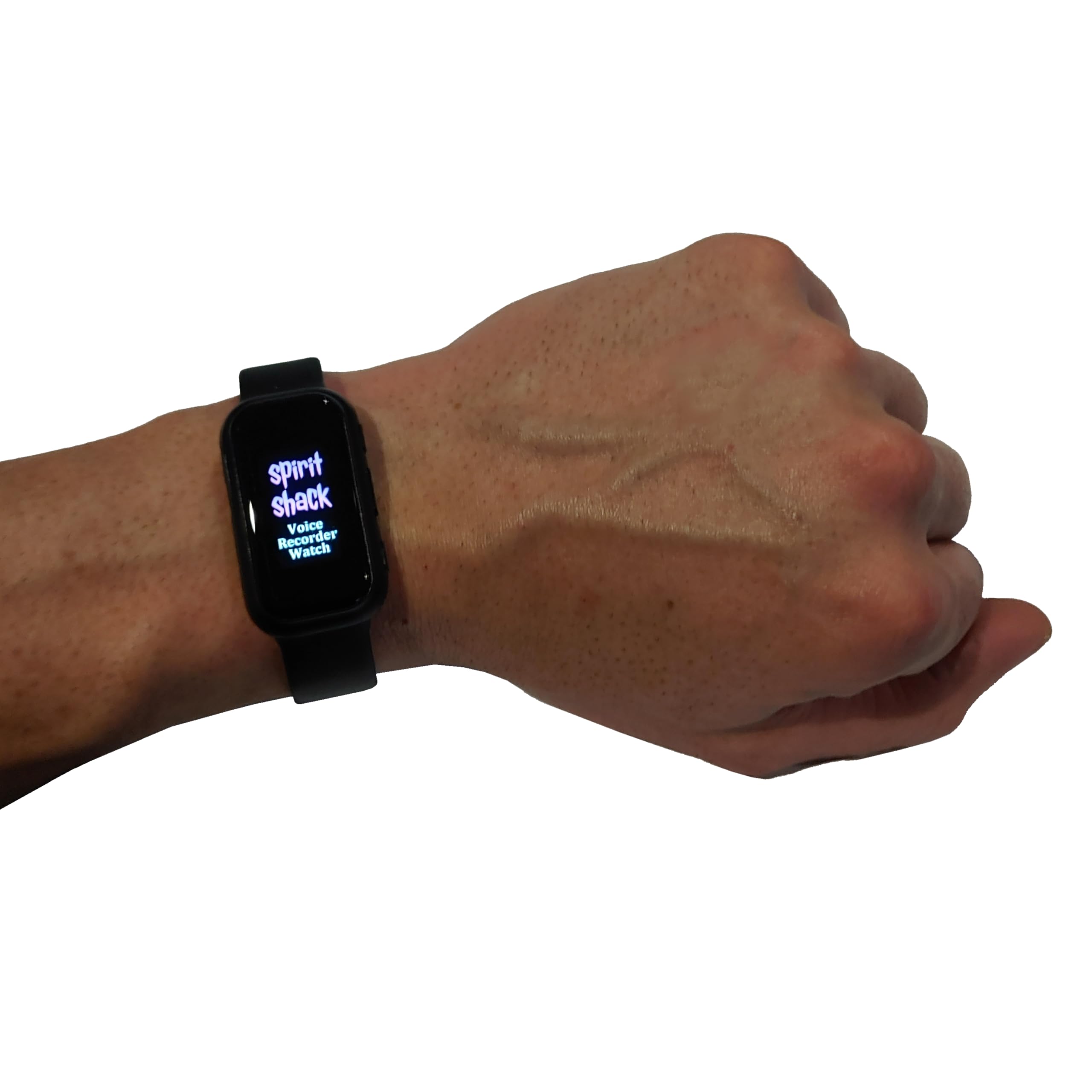
The SpiritShack Voice Recorder Watch is a discreet, wrist-mounted audio recorder designed for serious paranormal investigators and anyone who wants hands-free, always-on recording. With one simple switch, it starts recording automatically – so you can focus on the investigation instead of fumbling with gear. Worn comfortably like a watch, this device keeps the microphone away from handling noise, clothing rustle and unnecessary clicks. It records directly to 8GB of internal storage in high-quality MP3 or WAV, with a full colour display and intuitive controls for playback, file management and time settings. It’s small, powerful, and absolutely essential for capturing clear EVPs and documenting your sessions. Key Features Wrist-mounted voice recorder – hands-free EVP and audio documentation 8GB internal storage – up to ~96 hours of recording (mode-dependent) High-quality recording – MP3 or WAV formats, 256–1536 kbps selectable bitrate Full colour display – clear menus for settings, time, and file control One-switch auto recording – slide ON to start recording immediately Advanced menu options – EQ, variable speed playback, scene modes, segmentation Clock & screensaver – time display with customisable watch faces USB data & charging – appears as a USB drive for easy file transfer Fast charging – approx. 1 hour to full charge (via 5V charger or PC USB) Power-saving design – screen turns off when idle to extend battery life Voice-activated mode (optional) – only records when sound is detected Compact & lightweight – comfortable to wear for long investigations What’s in the Box 1 × SpiritShack Voice Recorder Watch (with integrated wristband) 1 × USB cable (charging & data transfer) 1 × Wired headphones (for playback and menu control) 1 × User guide How to Use the SpiritShack Voice Recorder Watch Important Notes Before Use Use a standard 5V (1A max) charger. Do not use 9V or fast chargers, as these may damage the device. Always slide the switch to OFF after recording to save the file. Do not connect the watch to a computer while recording – this can corrupt the current recording. Charging the Watch Make sure the watch is in the OFF position. Insert the USB cable into the watch’s charging/data port. Connect the other end to a computer USB port or a 5V, 1A wall charger. The battery icon will animate while charging and stop when fully charged (around 1 hour). Unplug the cable once fully charged to maximise battery lifespan. Recording Mode (EVP / Audio Capture) Unplug the headphones from the watch (headphones must NOT be connected for recording). Slide the main switch to the ON position. The recording screen will appear and the watch will automatically start recording. During recording: The screen will turn off after a short time to save power. Press + or – briefly to wake the screen and check the time. Long-press the – button on the time screen to return to the recording display. When you’re finished, slide the switch to OFF to stop and save the recording. Note: Turning the switch OFF is the only way to save the current recording. Playback Mode Ensure the watch is in the OFF position. Plug in the supplied headphones. Slide the switch to ON – the watch will start playing the most recent recording. Basic playback controls: Pause / Resume: Short-press + and – together to pause, then short-press again to resume. Next / Previous recording: Short-press + or – to move between files. Fast-Forward & Rewind Mode Turn the watch OFF. Plug in the headphones. Turn the watch ON. Press and hold the + button until playback begins. Now: + and – control fast-forward and rewind. Note: In FF/RW mode, volume adjustment is disabled. To restore normal controls, turn the watch OFF and ON again. Using the Menu (Playback Settings & Recording Options) With headphones connected and playback active, you can access advanced settings: In playback mode, long-press + to open the main menu. Use – to scroll through options and + to confirm. Key Menu Options Time – Set the watch time and date. Use + to move between fields. Use – to adjust values. After a few seconds of inactivity, settings save automatically. Sound Settings Volume – Short-press – to increase, long-press – to decrease, press + to confirm. Variable Speed Playback – Short-press – to speed up, long-press – to slow down, then + to confirm. Equalizer – Cycle through sound profiles (Rock, Funk, HipHop, Jazz, Classical, Electronic, Custom) with –, then confirm with +. Recording Settings Recording Format – Choose MP3 (smaller files) or WAV (higher quality). Bitrate – Select 256–1536 kbps. Higher bitrates give better quality but use more space. Voice-Activated Mode – Records only when sound is detected. For EVP work, we recommend leaving this OFF to avoid missing quiet responses. Recording Scene – Noise reduction profiles for different environments. Recording Segment – Set automatic file length (e.g. 10 minutes per file). Delete – Deletes the currently playing file. For safety, pause p
Customer reviews
10 Trustpilot reviews total, with 2 shown at a time.
I wrote to Bigamart's customer support and they accompanied the process of reshipping the item until it finally arrived. I felt a genuine effort to solve the problem till it was finally solved.
The package was here in Australia from England in a few days — so quick! Something was missing and they refunded it straight away. Pretty happy with these guys.
You might also like

![[Upgraded 2025] Tiny Real-Time GSM Listening Devices Voice Recorder, Spy GSM Bug It calls you, or you call it with Recording Device Voice enhancement, Huge autonomy Listening Devices for Spying](https://images-na.ssl-images-amazon.com/images/I/51vnwu2c35L.jpg)