Focusrite
⏳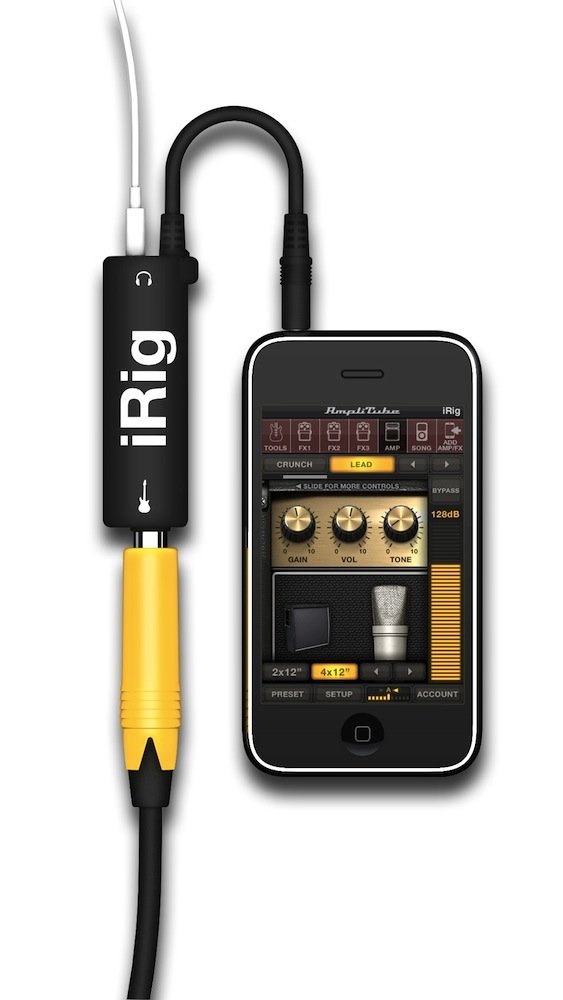
Product Description Jam Anywhere with World-Class Guitar & Bass Tone Amazing Guitar Tone, right there in your pocket. Click here for a larger image Turn your iPhone, iPod touch, iPad into the ultimate mobile Guitar and Bass Sound Studio Imagine carrying your entire guitar or bass rig around in your pocket. When we say entire, we mean tuner, pedalboard, amp head, cabinet, microphone and 4 track recorder. That's a lot to fit into your pocket, but now you can thanks to AmpliTube iRig. High Quality Guitar Interface for iOS Devices Click here for a larger image Plug In - iRig - High Quality Guitar Interface for iOS Devices The iRig is a revolutionary product that allows you to connect your guitar/bass to your iOS device. From there, your signal travels through the wonderful world of AmpliTube iOS software to give your guitar sound life and meaning. To use the iRig, you simply plug the 3.5mm TRRS end into the headphone jack of your iOS device. Then plug your guitar into the 1/4" jack using a standard guitar cable. To monitor your sound, plug your headphones/line out into the 3.5 mm headphone jack on the iRig. That's all there is to it. Now you're ready to Jam. You'll have at your fingertips the sound and control up to 4 recombinable simultaneous stompbox effects + amplifier + cabinet + microphone just like a traditional guitar or bass stage rig. Plus, you get all kinds of cool extras like a riff learner, music player and recording studio. Add amps and effects as you need them - you can expand your rig with more stomps, amps and cabinets via in-app purchase. iRig at a glance: Guitar & instrument interface adapter for iPhone/iPod touch/iPad Instrument interface adapter + guitar and bass tone mobile software Works on iPhone/iPod touch/iPad Compact 1/4" female input jack to 1/8" female output jack audio interface adapter Headphone/Amp/Powered Speaker OUT Connect electric guitar and bass Also works with line level signals from synthesizers, keyboards, mixers Includes AmpliTube FREE for iPhone or iPad (free download on iTunes App Store) Real time guitar and bass multiFX, recording, practicing app AmpliTube iOS - Amazing Guitar Tone, right there in your pocket Amazing Tone on your iPhone/iPod touch/iPad AmpliTube iRig comes with the AmpliTube FREE iOS app, a full-featured guitar and bass tone powerhouse app featuring some of the most popular and famous guitar amp sounds on the planet. You can plug in and instantly get a fantastic guitar sound utilizing our factory presets, or create a tone of your own. Plug in and play simplicity Click here for a larger image iRig - Plug in and play simplicity The new iRig interface adapter is the easiest way to get your instrument's signal into iPhone/iPod touch/iPad. It features a standard 1/4" instrument jack, a standard 1/8" (3.5mm) headphone out jack, and the iOS standard 1/8" TRRS jack for input on your iOS device. All you have to do is make your connections, then launch AmpliTube iOS or your favorite guitar/recording app and you're ready to go. The iRig is the ideal companion not only to the mobile AmpliTube series of apps, but also works with any other recording, processing or tuning app. Plus, you can also use the iRig with line level signal sources such as synthesizers, keyboards or mixers. Got a Mac? Get an iRig. Click here for a larger image Got a Mac? Get an iRig. Now for the hidden features… if you have a newer Mac computer, you can use the iRig as an audio interface for it. The newer Mac models feature a headphone jack that acts as a headphone/microphone input for headsets. This means that you can also use your iRig with your Mac laptop or desktop machine to take advantage of the higher processing power of your machine and you don't need an additional audio interface to use it. Simply plug the iRig into your headphone jack, plug your headphones/line out into your iRig and you've got a fully functioning audio interface for guitar/bass/keyboards, or any other instrument with a 1/4" out. Pretty cool. Hands free iPhone usage whilst you jam Click here for a larger image AmpliTube, AmpliTube Fender and AmpliTube Slash for iOS Click on a stompbox module slot and you can add a stompbox effect to your signal chain. There's a small navigation list of available effects directly under the navigation bar. Simply click on an effect name to load it into the slot. Swipe left and right to access all the available stompbox effects in your app. The signal flows from left to right and you can reposition effects in the chain to experiment with different textures and sounds. You get three stompbox slots daisy-chained together to add your favorite effects. You can turn on/off individual stompboxes simply by clicking the pedal button. Play Now for the good stuff. Download the AmpliTube FREE, AmpliTube Fender FREE or AmpliTube Slash app from the iTunes App store. Plug in your guitar and headphones via the iRig and launch the app. Immediately you'll see something very familiar - a complete rig. A
Customer reviews
10 Trustpilot reviews total, with 2 shown at a time.
I wrote to Bigamart's customer support and they accompanied the process of reshipping the item until it finally arrived. I felt a genuine effort to solve the problem till it was finally solved.
The package was here in Australia from England in a few days — so quick! Something was missing and they refunded it straight away. Pretty happy with these guys.
You might also like