RSHTECH
✓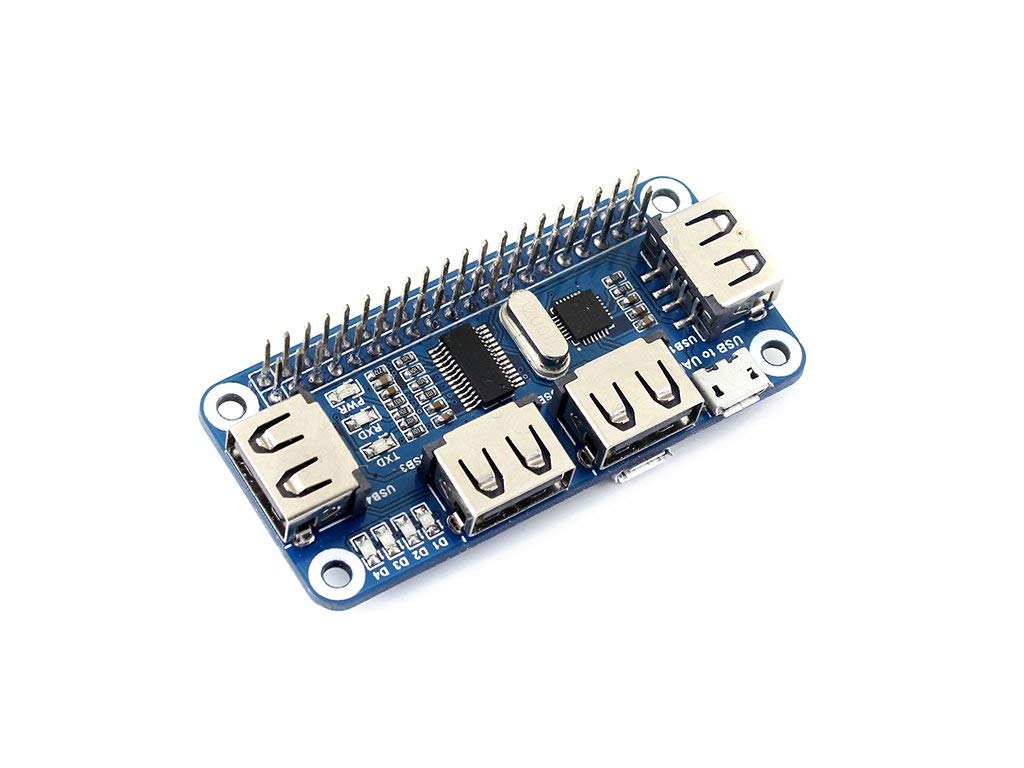
4 Port USB HUB HAT for Raspberry Pi, USB to UART Onboard Overview This is a 4 port USB hub for Raspberry Pi, provides more USB capability to your Pi, what's more, it features USB to UART converter for easy serial communication. It can work with various versions of the Pi, and the size of the board is designed to perfectly fit the Zero / Zero W. Specifications Operating voltage: 5V Dimension: 65mm × 30mm Mounting hole size: 3.0mm Development Resources Wiki :www.waveshare.com/wiki/USB_HUB_HAT?Amazon Packing List USB HUB HAT x1 Micro USB connector x1 Micro USB cable x1 RPi screws pack (2pcs) x1 How to use Take Raspberry Pi Zero W as an example: 1.Plug the module to the 40Pin GPIO connector on the Zero Board. 2.Plug the Micro USB connector to both the micro USB ports on the Zero W and the USB HUB HAT. 3.For serial connection: connect the "USB to UART" port to your PC with a USB cable and the LED will be turned on. Then install the CP2102 driver on your PC. Now you can access your Pi using serial connection (you should enable shell and kernel messages on the serial connection). 4.Attach USB devices to the USB1~USB4 ports and the corresponding LED will be turned on to indicate working state. Note: There are two micro USB ports on the USB HUB HAT. Only the "USB HUB" (but not "USB to UART") connector is used for USB expansion. You have to attach the USB HUB HAT to a Raspberry Pi B+/2B/3B with a USB cable although the module can be attached to a Pi Zero W with the Micro USB connector. If you cannot access your Pi using serial connection, try to enable the serial option in "sudo raspi-config".
Customer reviews
10 Trustpilot reviews total, with 2 shown at a time.
I wrote to Bigamart's customer support and they accompanied the process of reshipping the item until it finally arrived. I felt a genuine effort to solve the problem till it was finally solved.
The package was here in Australia from England in a few days — so quick! Something was missing and they refunded it straight away. Pretty happy with these guys.
You might also like